Features
Built for the full engagement lifecycle, from first finding to final report.
Finding management
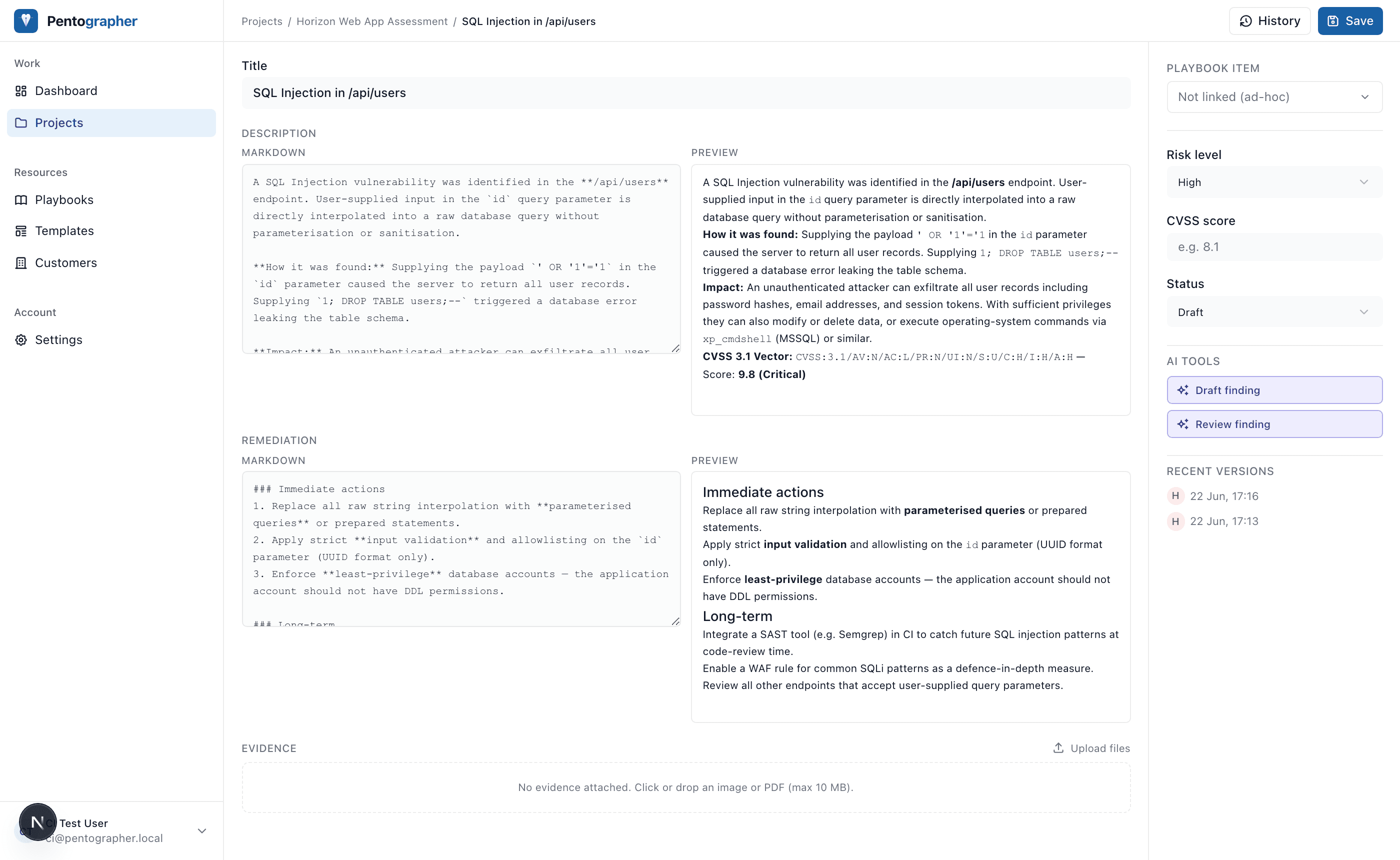
Everything about a finding, in one place
The finding editor shows a live rendered preview as you type. Every save is a versioned snapshot, so you can iterate freely and restore any earlier draft.
- ✓Split markdown / rendered preview
- ✓CVSS score, risk level, and status tracking
- ✓Evidence attachments (images, screenshots)
- ✓Full version history with one-click restore
- ✓Link findings to playbook items for traceability
Playbooks
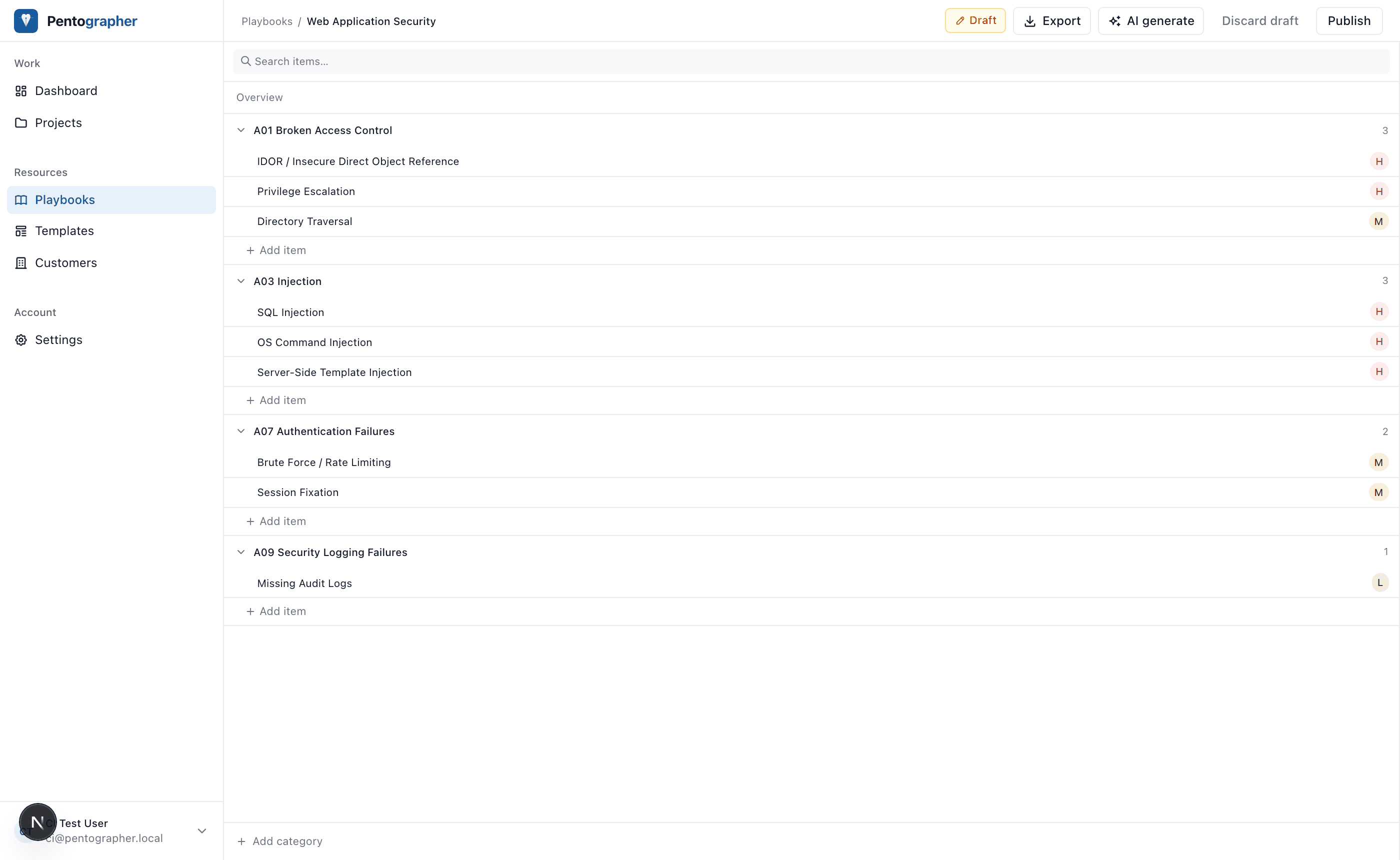
Structured checklists, not ad-hoc notes
Build reusable test checklists mapped to OWASP, PTES, or your own framework. Link every finding to a checklist item so you and your client know exactly what was tested.
- ✓Categorised items with default risk levels
- ✓OWASP Top 10 (2021) built-in
- ✓Import / export as portable JSON
- ✓AI-assisted generation and updates
- ✓Link findings to items for full coverage tracking
AI assistance
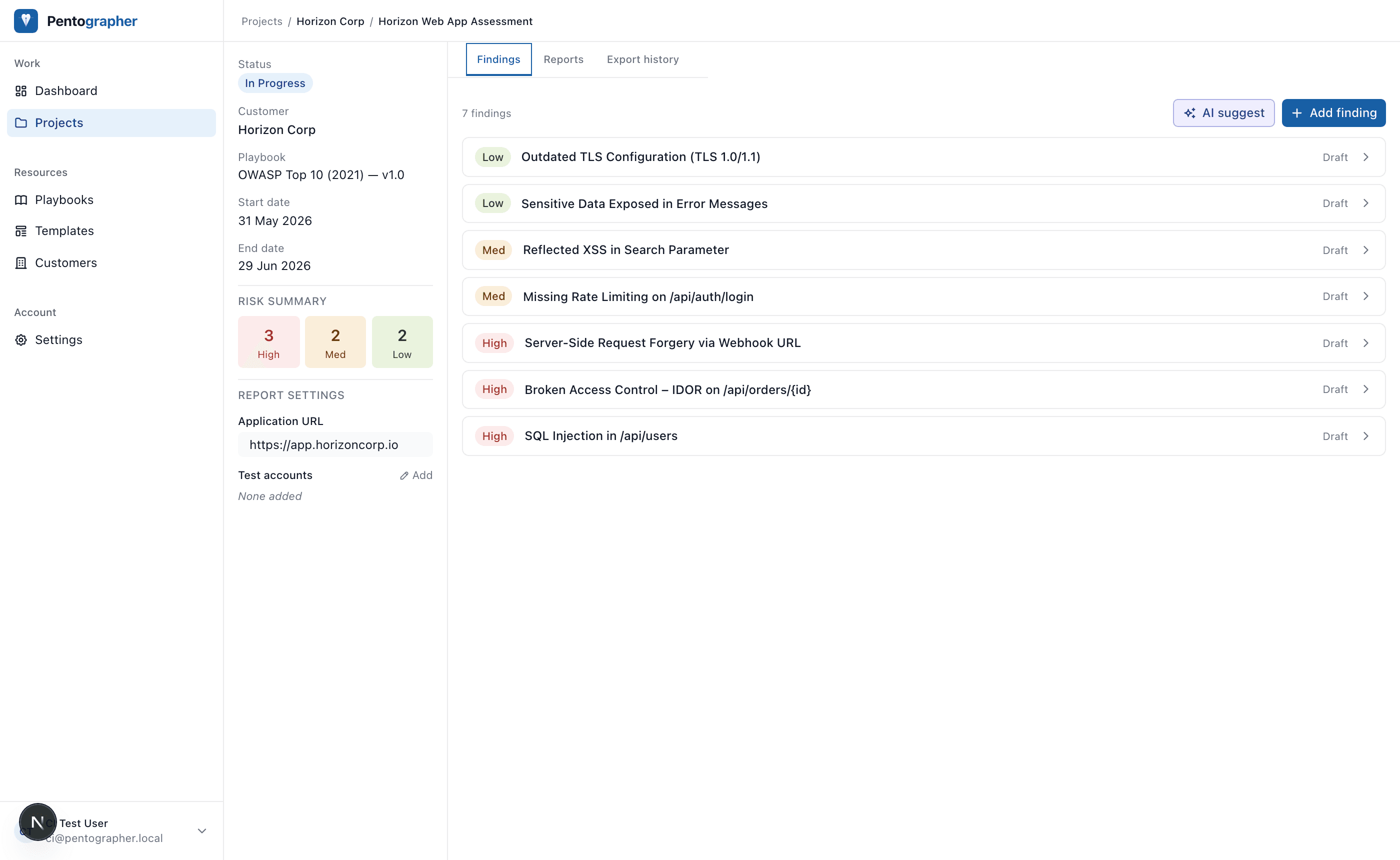
From tester notes to professional write-ups
Paste your raw notes, attach a screenshot, and let Claude draft a full finding description and remediation. A second pass reviews the draft for clarity and completeness. You always review before saving.
- ✓Draft from notes, evidence images, and playbook context
- ✓Review pass for quality and completeness
- ✓AI generate and patch for playbooks
- ✓Progress streamed token by token, no silent spinner
- ✓Bring your own Anthropic API key
Teams & permissions
Built for security teams, not just solo testers
Every account lives inside a workspace. Invite colleagues by email, assign them a role, and share findings, playbooks, and customer data across the team instantly. No manual exports or copy-paste.
- ✓Owner / admin / member / viewer roles
- ✓Invite teammates by email address
- ✓Admins can manage and revoke all org API keys
- ✓All resources belong to the workspace, not the individual
- ✓Personal workspace for solo users. No org UI until you need it
- ✓Ready for SAML / SSO when you need it
# Role capabilities at a glance

owner  → full control, transfer ownership
admin  → manage members, revoke any API key
member → create and edit findings, projects
viewer → read-only access to all resources

# Invite via the Team settings page
# or POST /api/settings/team
{
  "email": "colleague@yourcompany.com",
  "role": "member"
}

# API keys are org-scoped
# Removing a user never breaks integrations
MCP server
Query your pentest data from any AI agent
Pentographer exposes a full Model Context Protocol server at /api/mcp. Point Claude Desktop, Cursor, or any MCP-compatible client at it and ask questions about your projects, findings, and playbooks in natural language.
- ✓15 tools across projects, findings, and playbooks
- ✓API key authentication (ptg_ prefix)
- ✓Stateless transport, works behind any HTTP proxy
- ✓Compatible with Claude Desktop, Cursor, and more
# claude_desktop_config.json
{
  "mcpServers": {
    "pentographer": {
      "command": "npx",
      "args": [
        "-y", "mcp-remote",
        "https://app.pentographer.com/api/mcp"
      ],
      "env": {
        "MCP_HEADER_AUTHORIZATION": "Bearer ptg_your_api_key"
      }
    }
  }
}

# Ask Claude:
# "List high findings in the Horizon project"
# "Draft a remediation for the SQL injection finding"
# "Which playbook items have no linked finding?"
Self-hosted
Your data stays where you put it
Pentographer is MIT-licensed and built to run on your own infrastructure. A single Node.js process and a PostgreSQL database is all it takes. No telemetry, no vendor lock-in, no data leaving your network.
- ✓Runs on any Node.js 20+ host
- ✓PostgreSQL as the only external dependency
- ✓Local filesystem or S3-compatible storage for evidence
- ✓OAuth2 / API key auth built in
- ✓Full source available on GitHub (MIT license)
$ git clone https://github.com/lswartsenburg/pentographer
$ cd pentographer
$ cp .env.example .env.local

# Set DATABASE_URL, NEXTAUTH_SECRET, ANTHROPIC_API_KEY

$ pnpm install
$ pnpm db:migrate
$ pnpm dev

# http://localhost:3000
Deployment options
Choose how you run it
All deployment options include every feature. Pick based on where your data should live.
Cloudapp.pentographer.com | Self-hostedYour server | Desktop Mac / Win / LinuxComing soon | |
|---|---|---|---|
| Finding management | |||
| Playbooks | |||
| AI-assisted drafting | |||
| Report generation | |||
| Team workspaces | — | ||
| Role-based access control | — | ||
| Org-scoped API keys | — | ||
| MCP server | |||
| Evidence file uploads | |||
| Works offline | — | — | |
| Data stays local | — | ||
| No server to manage | — | ||
| Automatic updates | — | ||
| Price | Free | Free | Free |
| Start for free → | View on GitHub | Coming soon |